Streamline Table Copying with Text Table to Excel
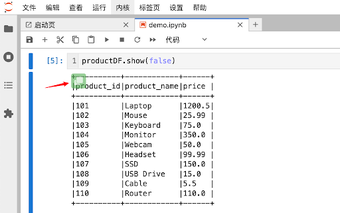
Text Table to Excel is a free Chrome extension designed to simplify the process of transferring ASCII text tables into Excel or Google Sheets. This tool automatically detects tables formatted in the +---+ style on web pages and provides a convenient one-click copy button. Users can easily convert these tables into TSV format, ensuring that the data is ready for direct pasting into spreadsheets with accurate cell alignment.
The extension significantly enhances productivity by eliminating the need for manual formatting adjustments that can be tedious and time-consuming. Once installed, users can navigate to any page containing ASCII tables, where the copy button will appear automatically. By clicking the button and pasting the content into Excel or Google Sheets, users can enjoy a seamless and efficient workflow. Note that if table data includes pipe characters within cells, the button will not display to prevent incorrect data separation.